
We talk about “the cloud” all the time. You take a picture on your phone, tap a button, and save photos online. We like to imagine our digital files floating safely in a magical, invisible sky, waiting right there for us whenever we need them.
But here is the simple truth: the cloud is not a cloud at all.
When you use cloud storage, you are really just using someone else’s computer. When you are backing up files whether they are your family vacation videos, customer emails, or business spreadsheets where does your data go? It travels through the internet and lands on physical servers.
Think of these servers as massive, noisy computers stacked up to the ceiling in huge, air-conditioned warehouses. These warehouses are owned by real companies, known as a cloud provides.
The Storage Unit Rule
To understand what happens to your data in the cloud, imagine you are renting a physical storage unit in your town.
- You pack up your stuff: You put your precious photo albums, your important paperwork, and your favorite furniture inside the unit.
- You pay the rent: You pay a small fee every month to keep your items there.
- You own the items, but not the building: You 100% own everything inside that little room. But, you do not own the building itself, the security gates, or the land it sits on.
Now, imagine the company that owns the storage building goes out of business. One morning, you drive over to get your things, but there is a heavy chain on the front gate. The owner is gone.
Your Digital Files Work the Same Way
This exact same scenario applies to internet storage. You completely own your data. But the company providing your safe cloud storage owns the physical “building” where it lives.
Scalability: Instant Growth vs Limited Expansion
So, we know that your files live on a company’s servers. But what happens if a cloud provider shuts down?
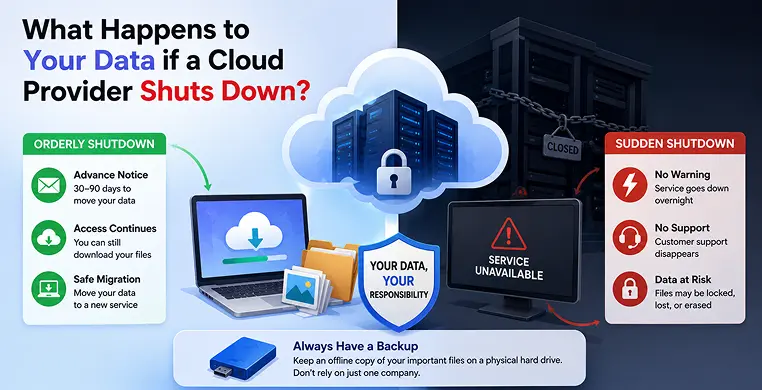
Just like any local store or restaurant, a cloud company can close its doors. When a cloud service goes out of business, the situation usually plays out in one of two ways. One path gives you plenty of time to prepare, while the other feels like a sudden nightmare.
Path 1: The Polite Goodbye (An Orderly Shutdown)
Imagine your landlord sending you a letter that says, “We are closing the building in two months. Please move your furniture.” It is definitely a little annoying, but it is fair. It gives you plenty of time to find a new place.
When a well-managed cloud service closes, they handle it exactly like this. This is known as an orderly cloud shutdown. Here is what you can expect:
- The Warning Email: The company sends out a clear notice, usually giving you anywhere from 30 to 90 days to pack your digital bags.
- The Lights Stay On: During this window of time, their computers keep running perfectly. You can still log in, and your passwords still work just fine.
- A Safe Exit: You have a stress-free chance to start Cloud Backup vs Local Backup downloading files from the cloud. You simply save your business documents, photos, and secure online backups to your own computer, and then move them to a new service.
Path 2: The Sudden Disappearance (A Disorderly Shutdown)
- The Sudden Blackout: The physical servers are powered off immediately. You try to check your online storage, but the website simply does not load.
- Total Silence: Customer support disappears. No one is answering emails, phone calls, or chat messages.
- Trapped Files: Your data is suddenly locked inside those massive computers in a warehouse you cannot visit.
The Villain: The "It’s Not Our Problem" Term
Whenever we sign up for a new online service, we all do the exact same thing: we scroll right to the bottom and click “I agree.” We rarely read the long cloud terms and conditions. But hidden deep inside those boring legal pages is the true villain of our story.
Tech experts call this rule the Shared Responsibility Model. It sounds like a complex business term, but in plain English, it is simply an “It’s Not Our Problem” clause.
The Leaky Roof Rule
To understand how this works, think about renting an apartment.
Imagine a huge rainstorm rolls through your town, and the roof of your apartment starts to leak. Who has to fix the roof? The landlord does. It is their building, so it is their job to keep the structure safe.
But, what if that leaky roof drips water straight down onto your expensive, brand-new television and ruins it? Your landlord is not going to buy you a new TV. They protect the building, but you are responsible for the stuff inside it. (This is exactly why people buy renter’s insurance!).
Who is Really Responsible for Cloud Data?
In the digital world, the Shared Responsibility Model works the exact same way.
When you wonder who is responsible for cloud data, the answer is split right down the middle:
- Their Job (The Building): The cloud provider is the landlord. They promise to keep the physical servers turned on. They pay the massive power bills, keep the warehouse cool, and lock the doors so no one steals the actual computers.
- Your Job (The TV): You are the renter. You are 100% responsible for the files you place inside their system.
If you accidentally delete a folder, if a hacker guesses your password, or if the cloud company suddenly goes bankrupt and shuts off the servers, the company will point right back to that user agreement. They promised you a working server; they never promised to magically protect the importance of your files.
When it comes to data loss in the cloud, the hard truth is that protecting your digital files is entirely up to you. You cannot rely on the cloud company to be your safety net.
The Rescue Mission: How to Build Your Escape Boat
So far, the story of a sudden cloud shutdown might sound a bit scary. But here is the great news: you hold the power to save your own files. You do not need to be a computer expert to protect your digital life.
You just need to build a simple escape boat before a storm ever hits. By taking a few easy steps right now, you can completely protect cloud data from disappearing. Here is your everyday guide to keeping your files safe.
The Magic Formula: The 3-2-1 Rule
If there is one golden rule for how to backup cloud files, it is the 3-2-1 backup rule. Think of it as making sure you always have a spare key to your house hidden somewhere safe. It works like this:
- Keep 3 copies of your data: Do not just keep one copy of a precious home video or a vital work document. Have three.
- Use 2 different types of storage: Keep one copy on your laptop, and one in the cloud.
- Keep 1 copy totally offline: This is the most important step. Keep one copy on a physical external hard drive sitting on your actual desk.
Why is that offline copy so magical? Because if your cloud provider shuts down overnight, or if someone hacks your online account, the physical drive in your home is completely untouched. Your data is still right there in your hands.
Do Not Put All Your Eggs in One Basket
Read the Exit Signs (Data Portability)
When you walk into a crowded movie theater, it is always smart to spot the exit signs just in case. You should do the exact same thing before you pay for secure online backups.
Before you upload your first file to a new service, look for a clear cloud exit strategy. Ask yourself: How easy is it to leave?
In the tech world, this is called data portability. It means you should be able to pack up and move easily. Check the settings to see if there is a simple button for downloading files from the cloud all at once. If a company forces you to download your photos one by one, that is a bad sign. You want a provider that lets you grab all your stuff quickly and easily if you ever need to make a fast exit.
Key Takeaways
- You are renting space: The cloud is just someone else’s computer. You own your data, but they control the access.
- Advance notice is not guaranteed: While some companies give you months to move your files, sudden bankruptcies can lock you out of your data overnight.
- Your data is your responsibility: Cloud providers protect their servers; they do not promise to protect the actual files inside them.
- Always have a backup: Keep an offline copy of your most important files on a physical hard drive so you are never completely reliant on a single company.
Conclusion
We started this story by looking at the dark side of the internet and asking what happens when cloud storage shuts down. It sounds like a bad dream to imagine losing your precious family photos or important business paperwork overnight. But every good story deserves a happy ending, and this one is entirely in your hands.
The best news of all is that total data loss is 100 percent preventable. You do not need a computer degree or a massive budget to avoid losing digital files. You just need to remember that the internet is a helpful tool, not an unbreakable magic vault.
You Hold the Ultimate Key
Enjoy the Cloud, But Protect Yourself
The cloud is a wonderful invention. It lets you share videos with family across the world and work on spreadsheets from your phone. You should absolutely keep using it to make your life easier.
Just make sure you never leave your only copy of something important in a digital building you do not own. You are the rightful owner of your memories and your hard work. By keeping data safe offline, you ensure that no matter what happens to a company, your files will always stay exactly where they belong with you.
Frequently Asked Questions
Is my data actually safer on my own computer than in the cloud?
Not necessarily. While cloud companies have top-tier security to prevent hackers, they are vulnerable to business failures. The safest approach isn’t “one or the other” it is having both. Use the cloud for convenience and easy access, but keep a physical backup (like an external hard drive) for true peace of mind.
How do I know if my cloud provider is about to shut down?
Most reputable, large-scale cloud providers don’t just vanish. However, smaller or newer startup companies are riskier. If you notice a service has stopped updating its website, stopped responding to support tickets, or is having trouble processing payments, those are red flags that you should move your data to a more stable service immediately.
What is the easiest way to start backing up my data today?
You don’t need anything fancy. Start by identifying your most important files like family photos or tax documents. Buy a standard external hard drive, plug it into your computer, and copy those folders onto it. It takes only a few minutes and ensures you have a “digital lifeboat” if the internet ever lets you down.
Does "data portability" mean I can move all my files at once?
Yes, that is the goal! Data portability means the service provides an easy way often a “Download All” or “Export” button to grab all your data in one go. If a service makes it extremely difficult or impossible to download your own files in bulk, it’s a sign that you might be stuck if they ever decide to close.
If a cloud company goes bankrupt, is there any legal way to force them to give me my files?
Unfortunately, no. If a company goes into bankruptcy, your data is often considered an “asset” of the business. In most cases, the courts and liquidators are focused on paying back the company’s debts, and they rarely prioritize helping individual users recover personal files. This is exactly why relying on the “It’s Not Our Problem” clause is so risky once the servers are locked, you have very little legal leverage.