
It’s 11 PM on a Sunday. You’re staring at your phone, trying to remember if you paid the electricity bill, whether that work report is due Tuesday or Wednesday, and why you feel like you’ve been “busy” all week but got nothing done.
Sound familiar?
Most of us aren’t disorganized because we’re lazy. We’re disorganized because we’re trying to keep three different lives work, money and time running in our heads at once, with no system to catch the things we forget. And the moment one thing slips everything else feels shaky too.
Here’s the good news: you don’t need a fancy planner, an expensive app subscription, or a total life makeover to fix this. You just need the right free tools, used the right way.
In this guide, we’ll walk through 10 free tools to organize your life split into three simple buckets: work, money and time. If you’ve been searching for the best free productivity apps for beginners, this is your starting point. No jargon, no 2-hour setup tutorials, just tools that work.
Why You Don't Need to Pay to Get Organized
Here’s a myth worth killing early: better organization doesn’t come from a better (read: pricier) app. It comes from a system you’ll actually stick to.
The tools in this list are completely free to start, and honestly, most beginners never even need the paid versions. What matters more than the price tag is picking a simple productivity system for beginners with free tools and giving it a real try not switching apps every other week because the last one “didn’t work.” Usually, it wasn’t the app. It was that we gave up after two days.
This list is really a beginner productivity toolkit of free apps you can set up this weekend, for zero dollars.
How This List Is Organized
To keep things simple, we’ve split these free tools to manage tasks, money, and time into three groups
- Work: Tools to track what you need to do and when
- Money: Tools to track what’s coming in and going out
- Time: Tools to plan your days and build better habits
Let’s go through each one.
Section A: Tools to Organize Your Work
This is usually where people start, because a messy to-do list is the loudest kind of chaos. Here are the best free task management apps worth trying.
A clean, simple to-do list app that doesn’t try to do too much.
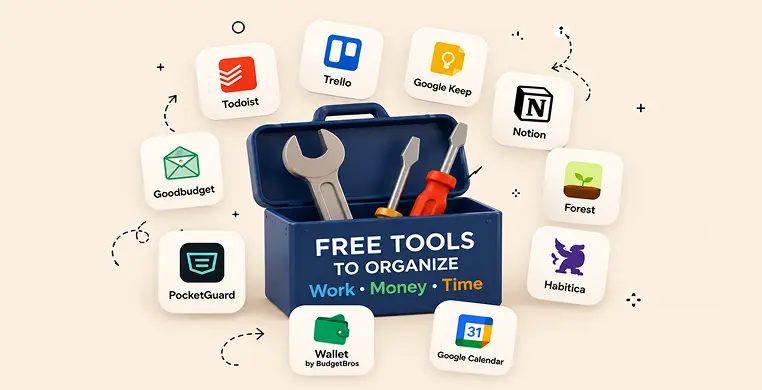
Todoist is one of the most popular free organization apps for beginners, and for good reason it’s just a to-do list, done really well. You type a task, set a due date, and it shows up when you need it. No confusing menus.
How to start: Add just three tasks today one for work, one personal, one you keep forgetting. That’s it. Don’t try to plan your whole month on day one.
A visual board that shows your projects as moving cards instead of a wall of text.
If your work involves multiple steps or you’re managing a bigger project, Trello is a great pick. You create columns like “To Do,” “Doing,” and “Done,” and drag cards between them as you make progress. It’s one of the best free apps to organize work tasks and projects because you can literally see your progress, which feels genuinely satisfying.
How to start: Make one board for one project. Resist the urge to make ten boards on your first day.
A sticky-note app for the small stuff your brain keeps trying to hold onto.
Not every task deserves a full project plan. Sometimes you just need to jot down “call the plumber” or “buy milk.” Google Keep is fast, free, and syncs across your phone and laptop instantly.
How to start: Use it only for quick notes and small reminders keep the bigger tasks in Todoist or Trello so things don’t get mixed up.
An all-in-one workspace once you’re ready to combine everything in one place.
Notion is a bit more powerful, so it’s not the first stop for a total beginner but once you’re comfortable with the basics, its free plan lets you build to-do lists, notes, and even simple project trackers in one spot. Many people searching for free tools to organize your life and work eventually land here because it can replace two or three separate apps.
Section B: Tools to Organize Your Money
Managing tasks is one thing. Managing money is where most beginners freeze up completely usually because nobody ever showed them a simple way to start. These free budgeting apps for beginners make it far less intimidating.
A budgeting app built on the old “envelope system,” just digital.
You give every dollar a job rent, groceries, fun money by splitting your income into virtual envelopes. When an envelope is empty, you stop what you spend in that category until the next month. It’s one of the simplest personal finance tools for someone who’s never budgeted before.
How to start: Set up just three envelopes to begin: rent, groceries, and “everything else.” Add more once the habit sticks.
A tool that answers one question: how much can I actually spend right now?
PocketGuard links to your accounts and shows what’s left after your bills and savings are accounted for. If spreadsheets make your eyes glaze over, this is a friendlier way to get expense tracking without doing any math yourself.
How to start: Check it once a day for a week, just to build the habit of looking before you spend.
A straightforward expense tracker for logging where your money actually goes.
This is one of the better free expense tracker apps for beginners because it’s built for manual logging you tap in a purchase, pick a category, and it quietly builds a picture of your spending habits over time. Great if you like a bit more control than an auto-syncing app gives you.
How to start: Log every purchase for just seven days. You’ll be surprised what you learn.
Section C: Tools to Organize Your Time
You could have the world’s best to-do list and budget, and still feel behind because time is the one resource you can’t get back once it’s gone. These are the best free time management apps to help you actually use your hours well.
The simplest free daily planner app, and probably one you already have.
Most people use Google Calendar for meetings and forget it can be so much more. Try time blocking instead of a to-do list floating with no deadline, you give each task an actual slot on your calendar. “Write report” becomes “Write report, 10 AM–11 AM.” It turns a vague plan into a real one.
How to start: Block out just your top three tasks tomorrow, nothing else. Leave the rest of the day open.
A free time tracker that shows you where your hours actually go.
Most beginners think they know how they spend their time. Clockify usually proves them wrong. You start a timer when you begin a task and stop it when you’re done over a week, you’ll see a clear picture of what’s eating your day.
How to start: Track just your work hours for three days. Don’t overthink the categories.
A simple, free habit tracker that turns good intentions into visible streaks.
Getting organized isn’t a one-time fix it’s a handful of small habits repeated daily. Loop Habit Tracker lets you mark off habits like “drink water,” “check budget,” or “plan tomorrow,” and watching the streak grow is oddly motivating.
How to start: Track just one habit ideally, the one from this article you want to stick with most.
How to Actually Stick With These Tools
Here’s the part most “top 10 apps” lists skip: knowing about a tool isn’t the same as using it.
The biggest mistake beginners make is downloading all ten tools in one afternoon, feeling briefly inspired, and quitting within a week because it’s simply too much to manage. That’s not a productivity system that’s just moving the chaos from your head into your phone.
Instead, try this: pick one tool per bucket one for work, one for money, one for time and use just those three for two full weeks. Once they feel automatic, add the next one if you still need it. You’ll likely find that three well-used tools beat ten half-used ones every time.
This is really the heart of how to get organized at work and home: not more apps, just consistent, small use of the right ones.
Loved What You Just Read?
Let's Build Something Just as Great — For Your Business.
From web & mobile apps to UI/UX, AI solutions, and digital marketing — NGD Technolab turns ideas into scalable, real-world products. 14+ years, 550+ projects, one team you can rely on.
Key Takeaways
- You don’t need to spend money to get organized all 10 tools above are free to use.
- Start with just one tool per category (work, money, time) instead of installing everything at once.
- Consistency beats complexity a simple system you actually use wins over a perfect one you abandon.
- Task tools, budgeting apps, and time trackers work best together, not in isolation.
- Revisit your setup every few weeks and drop anything you’re not actually using.
Conclusion
Remember that 11 PM Sunday scramble from the start of this article? That version of you doesn’t need to disappear overnight, and honestly, it won’t. But with even one tool from each bucket a task app, a budgeting app, and a planner that scramble starts to fade into something calmer.
You don’t need to be a “productivity person” to use these tools well. You just need to start small, pick what actually fits your life, and give it more than two days before deciding if it’s working.
So here’s your first step: pick just one tool from this list and open it right now. Which one are you starting with? Drop it in the comments it might just be the nudge someone else needs too.
Frequently Asked Questions
What are the best free apps to organize your life?
A good mix covers all three areas of your life: a task app like Todoist for work, a budgeting app like Goodbudget for money, and a calendar or habit tracker like Google Calendar or Loop for time. Using one from each category, rather than ten random apps, tends to work best for beginners.
Are free budgeting apps actually free, or do they have hidden costs?
Apps like Goodbudget, PocketGuard, and Wallet by BudgetBros offer solid free plans that cover everything a beginner needs. Some do have optional paid upgrades for extra features, but you can manage your money fully on the free tier for a long time before you’d ever need to consider upgrading.
What's the best free calendar app for beginners?
Google Calendar is usually the easiest starting point since most people already have it through their Google account. It’s simple enough to block out your day using time blocking, and it syncs automatically across your phone and computer.
How do I start a simple productivity system as a beginner?
Choose one tool for tasks, one for money, and one for time that’s it. Use only those three for two weeks before adding anything else. Most beginners fail not because the tools don’t work, but because they try to set up everything at once.
Can one app handle both my tasks and my time, or do I need separate tools?
Some apps, like Notion, can eventually handle both once you’re comfortable with the basics. But for beginners, it’s usually easier to keep task management (like Todoist) and time planning (like Google Calendar) as two separate, simple tools rather than one complicated system.