If you’re weighing whether to build for Apple Vision Pro, the questions that actually matter are simple: what will it cost, which tools do you need and is anyone besides early adopters actually buying software for this thing? The short answer is that the market has narrowed sharply toward business buyers, the price of entry just went up and the tooling has matured enough that a serious build is no longer a research project. Here’s what that means in practice for anyone planning Apple Vision Pro app development.
The Market Has Quietly Become an Enterprise Story
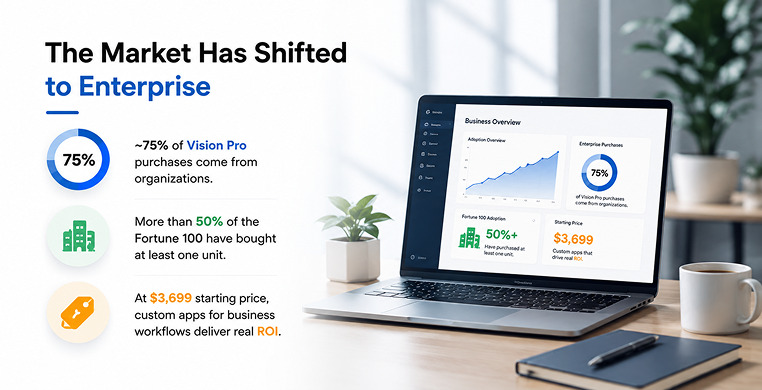
Vision Pro launched as a consumer device, but consumers never really showed up. Meta’s Quest line still dominates unit sales in the headset market overall and Apple’s own Vision Pro sits at a small slice of that broader picture. What changed the calculus is who kept buying after the initial hype faded: businesses. Industry analysts at IDC have pointed out that roughly three-quarters of Vision Pro purchases now come from organizations rather than individual consumers and Apple has confirmed that more than half of the Fortune 100 has bought at least one unit for internal use.
That shift matters for anyone planning a build. A $3,499 launch price was already a hard sell to a general audience and Apple raised the starting price to $3,699 for the 256GB model in June 2026, citing rising memory and component costs across its entire lineup. Higher-storage models now run up to $4,199.
At that price, mass-market consumer apps rarely pencil out. Custom software for specific business workflows does, because a single headset replacing an expensive training program, a physical prototype or a surgical rehearsal can justify the cost many times over.
Apple has also signaled where its own attention is going. Reporting this year indicates the next hardware generation is on hold until at least 2028, with the company redirecting engineering effort toward lightweight AI-enabled glasses instead.
For app developers, that’s actually useful information: the current M5-based Vision Pro and visionOS platform will likely be the stable target for several years, which lowers the risk of building against a moving hardware baseline.
What Vision Pro App Development Actually Costs
Pricing depends almost entirely on how much of the physical world your app needs to understand and replace. Apple’s visionOS design language splits apps into three tiers of immersion — flat 2D windows in the Shared Space, bounded 3D Volumes, and fully immersive Full Space environments — and cost scales with each step up.
| Application Type | Typical Budget | Timeline | What It Involves |
|---|---|---|---|
| iOS-to-visionOS port | $25,000 – $150,000 | 6–10 weeks | Adapting an existing Swift/iPad codebase into a flat window |
| Windowed 2D app | $40,000 – $80,000 | 3–4 months | A native spatial interface that behaves like a floating window |
| Minimum viable product | $15,000 – $40,000 | 4–8 weeks | A stripped-down build for testing demand before a full commitment |
| Mixed Reality (Volumes) | $90,000 – $180,000 | 4–6 months | Interactive 3D objects placed in real-world space |
| Fully Immersive (Full Space) | $200,000 – $500,000+ | 6–12 months | A custom environment that fully replaces the user's surroundings |
| QA and testing | $5,000 – $25,000 | Ongoing | Frame-rate, ergonomic, and spatial-tracking validation |
| Annual maintenance | $2,000 – $15,000/year | Ongoing | OS compliance, bug fixes, and performance tuning |
The biggest hidden line item is 3D content. High-fidelity asset pipelines — modeling, texturing and optimizing objects for realistic rendering — commonly eat up 20% to 30% of a total project budget, since spatial apps need geometry and materials that hold up when a user can walk around them and look closely.
Developer location changes the math substantially, too. North American and Western European senior visionOS engineers typically bill $100 to $200 an hour, while teams in Eastern Europe or parts of Asia often charge $40 to $80.
That gap alone can shift a mid-sized project’s baseline cost by tens of thousands of dollars, which is why many agencies now offer hybrid teams that pair a local lead with offshore engineering capacity.
The Tech Stack You'll Actually Be Working With
Native development on visionOS centers on a small, tightly integrated set of Apple frameworks. Swift is the language; SwiftUI handles windows, spatial layout and interface elements and RealityKit does the heavy lifting for 3D rendering, physics and simulation.
Since visionOS 26, RealityKit’s entities and animations are observable directly inside SwiftUI, which removed a lot of the boilerplate that used to be needed to keep the two frameworks in sync — a change Apple detailed at its WWDC developer sessions.
ARKit sits underneath all of it, handling world tracking, scene understanding and hand tracking. For building and previewing 3D scenes, most teams use Reality Composer Pro, which plugs directly into Xcode and as of its third version, supports live preview changes on an actual headset in near real time. RealityKit also supports the MaterialX open standard for shaders and can render Gaussian-splat scenes for more photorealistic environments.
Not every team builds natively, though. Studios that already maintain a codebase in Unity — particularly game studios — commonly use Unity’s PolySpatial framework to bring existing 3D content to visionOS without a full rewrite, while preserving features like hand tracking and spatial audio. Godot, an open-source alternative, has also added visionOS support through Apple’s CompositorServices.
For workloads too heavy to run on the headset itself, such as large CAD models, teams offload rendering to remote workstations or services like NVIDIA CloudXR, streaming the result to the device — a pattern Apple formalized through its Spatial Preview and foveated streaming tools introduced with visionOS 27.
The practical decision usually comes down to this: native RealityKit and SwiftUI give the deepest platform integration and the best long-term support, while Unity or Godot make more sense if you’re porting an existing 3D product rather than starting from a blank canvas.
Where the Real Opportunities Sit
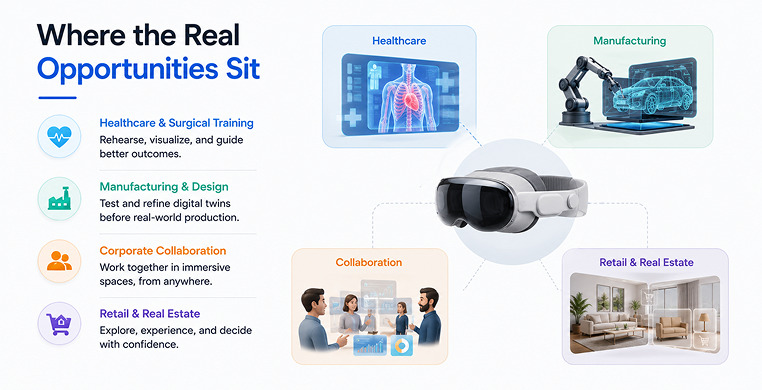
Four verticals show up consistently in enterprise deployments and they share a common trait — each solves a problem that’s expensive to solve any other way.
- Healthcare and surgical training: Spatial apps let surgeons rehearse procedures and review complex anatomy in three dimensions before ever touching a patient and hospitals use the headset for tele-mentoring during actual procedures.
- Manufacturing and industrial design: Engineers review full-scale digital twins of equipment before it’s built, catching structural problems that are far cheaper to fix on screen than on a factory floor.
- Corporate collaboration: Knowledge workers use the headset’s expanded screen space to arrange multiple virtual monitors, while spatial personas let remote teams meet as if they’re in the same room.
- Retail and real estate: Buyers walk through properties or try products virtually before committing, which cuts down on returns and in-person visits.
Companies including SAP, Porsche and Lowe’s have publicly discussed custom Vision Pro deployments in these categories and the through-line in nearly all of them is measurable time or cost saved, not novelty.
Mistakes That Derail Vision Pro Projects
A handful of avoidable errors show up again and again in early builds. Sessions that run much past 45 minutes tend to cause visual fatigue, so apps need natural break points built into the flow. Interfaces ported directly from touchscreens without redesigning tap targets frustrate users, since gaze-and-pinch input needs larger, more forgiving hit areas — Apple recommends a minimum of 44 points.
Loved What You Just Read?
Let's Build Something Just as Great — For Your Business.
From web & mobile apps to UI/UX, AI solutions, and digital marketing — NGD Technolab turns ideas into scalable, real-world products. 14+ years, 550+ projects, one team you can rely on.
On the enterprise side, skipping device management support such as Apple Business Manager enrollment or Jamf and Kandji integration is a common reason procurement stalls after a pilot succeeds technically. And teams that jump straight to a fully immersive Full Space build before validating demand with a simpler Volume or windowed app often end up spending far more than the idea ever earns back.
The pattern across all of this is consistent: Vision Pro app development has moved past the experimental phase into something closer to specialized enterprise software engineering, where the tooling is stable, the buyers are identifiable, and the cost of getting the scope wrong is the biggest risk in the room.
Conclusion
Vision Pro app development isn’t a bet on consumer adoption anymore — it’s a bet on whether a specific business workflow is worth solving in 3D. The framework is stable, the enterprise buyers are already spending and the cost of a project now scales predictably with how immersive it needs to be.
Start with the smallest version of the idea that proves the concept, whether that’s a windowed app or an MVP and let real usage tell you whether a full immersive build is worth the investment.
Frequently Asked Questions
How much does it cost to build a custom Apple Vision Pro app?
Most projects fall between $40,000 and $80,000 for a standard windowed 2D app, $90,000 to $180,000 for an interactive Mixed Reality build using Volumes and $200,000 or more for a fully immersive Full Space experience. A simple MVP built to test demand can come in as low as $15,000.
What programming languages and frameworks do I need for visionOS development?
Native visionOS apps are built with Swift, SwiftUI for windows and layout and RealityKit for 3D content, physics and rendering, with ARKit handling scene and hand tracking underneath. Reality Composer Pro is used to build and preview 3D scenes inside Xcode. Teams porting existing 3D content instead often use Unity PolySpatial or Godot.
How much does it cost to port an existing iPad or iOS app to visionOS?
A straightforward port of an existing Swift codebase into a flat visionOS window typically costs $25,000 to $150,000 and takes six to ten weeks, depending on how much of the interface needs to be redesigned for spatial input rather than touch.
Why are enterprises the primary buyers of Vision Pro software rather than consumers?
At a $3,699 starting price, mass-market consumer apps rarely make financial sense, but businesses routinely justify the cost when a headset replaces something more expensive, such as physical prototyping, in-person surgical training or on-site travel. IDC estimates roughly three-quarters of Vision Pro purchases now come from organizations, and Apple has confirmed adoption by more than half of the Fortune 100.
Should I build with native RealityKit or use Unity PolySpatial for my Vision Pro app?
Native RealityKit and SwiftUI give the deepest platform integration, the best long-term Apple support and are usually the right choice for apps built specifically for visionOS. Unity PolySpatial makes more sense if you’re bringing an existing Unity-based 3D product or game to Vision Pro without rebuilding it from scratch.