
Sarah typed one line into her AI chatbot: “Write me a marketing email.”
Thirty seconds later, she got back a generic, robotic email that could have been written for any brand, any product, any audience. She read it, sighed, and closed the tab thinking, “AI isn’t as smart as everyone says.”
But here’s the thing. The AI wasn’t the problem. The message was.
If you want AI to actually understand you, you have to talk to it the way you’d talk to a smart new employee — someone talented, but who knows nothing about your business until you tell them. Once you say things clearly, give the right details, and ask in the right way, the answers change completely.
What Is a Prompt, Really?
A prompt is simply the instruction or question you give an AI tool like ChatGPT, Claude, or Google Gemini. That’s it. No mystery, no code, no special software skill required.
But here’s where most people slip up: they treat a prompt like a search query. On Google, you type a few keywords and the engine hunts through millions of pages to find something close to what you meant. AI doesn’t work that way.
When you talk to AI, you’re not searching for an answer that already exists somewhere online. You’re asking it to think and create something new, based only on what you tell it. So a prompt isn’t a search query — it’s closer to a conversation.
And like any conversation, it works better when you explain yourself instead of throwing out a fragment and hoping for the best.
Why AI Doesn't "Get" Vague Requests
Think about what happened with Sarah’s email. “Write me a marketing email” gives an AI tool almost nothing to work with. What’s the product? Who’s it for? Is it playful or professional? Long or short? Since none of that was said, the AI had to guess — and guessing rarely produces great results.
This is the single biggest reason people feel let down by AI tools. It’s rarely that the AI is “bad.” It’s that the instructions were too thin. The fix isn’t complicated, though. It just takes a small shift in how you write your prompts.
The Simple Framework Anyone Can Use: Persona, Task, Context, Format
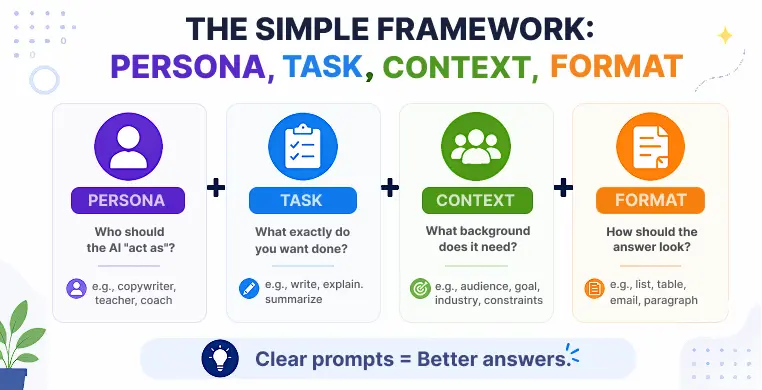
If you remember only one thing from this blog, remember these four words. They form a simple prompt engineering framework that works for beginners and professionals alike.
- Persona: Who should the AI “act as”? A teacher, a lawyer, a friendly copywriter, a fitness coach?
- Task: What exactly do you want done? Write, summarize, brainstorm, explain, compare?
- Context: What background does it need? Your audience, your goal, your industry, your constraints?
- Format: How should the answer look? A list, a table, a short paragraph, a formal email?
Let’s rewrite Sarah’s prompt using this idea:
“Act as an experienced email copywriter (persona). Write a marketing email announcing our new eco-friendly water bottle (task). Our audience is young professionals who care about sustainability, and the tone should feel upbeat and confident, not salesy (context). Keep it under 150 words, with a short subject line and one clear call to action (format).”
Same tool. Same AI. Completely different result — because now the AI actually understands what she wants.
Practical Prompting Tips That Work
Once the framework clicks, these smaller habits make your prompts even sharper.
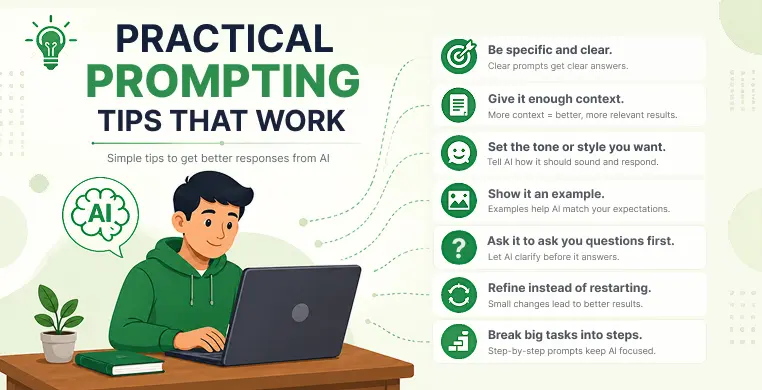
Instead of “help me with my resume,” try “help me rewrite the summary section of my resume for a project management role, keeping it to three sentences.” Specific requests remove guesswork.
AI can’t read your mind or your company handbook. If you want a good answer, hand over the details a new colleague would need — your goals, your audience, any rules to follow.
Tell the AI whether you want it to sound formal, casual, witty, or straight to the point. Without this, it’ll default to something generic.
If you have a sample of writing, data, or a format you like, share it. AI is excellent at matching a pattern you give it, and this alone can massively improve results.
This one surprises people. You can literally type: “Before you answer, ask me any questions you need to give a better response.” Good AI tools will pause and clarify instead of guessing — much like a thoughtful assistant would.
If the first answer isn’t quite right, don’t throw it away and start over. Just tell the AI what to fix: “make it shorter,” “make it sound less formal,” “add one more example.” This back-and-forth, sometimes called iterative refinement, almost always beats trying to write one “perfect” prompt from scratch.
For anything complex — a full report, a content plan, a research summary — ask the AI to handle it one step at a time instead of all at once. This is sometimes called prompt chaining, and it keeps the AI focused instead of overwhelmed.
Loved What You Just Read?
Let's Build Something Just as Great — For Your Business.
From web & mobile apps to UI/UX, AI solutions, and digital marketing — NGD Technolab turns ideas into scalable, real-world products. 14+ years, 550+ projects, one team you can rely on.
A Quick Note on Different AI Tools
These tips work whether you’re prompting ChatGPT, Claude, or Google Gemini, but each tool has small quirks. ChatGPT tends to reward very structured prompts with clear steps. Claude often does its best work when you explain your reasoning and goals, almost like you’re briefing a thoughtful colleague.
Gemini tends to respond well when you ground it with real-world context, like dates, sources, or specific scenarios. The core idea — persona, task, context, format — still applies everywhere.
Common Prompting Mistakes to Avoid
- Assuming the AI remembers things you never actually told it
- Giving one-word or one-line instructions for complex tasks
- Not mentioning the format you want, then being unhappy with the format you got
- Giving up after one bad answer instead of refining the prompt
- Overloading a single prompt with five unrelated requests at once
Key Takeaways
- A prompt is an instruction, not a search query — AI creates an answer instead of finding one
- Vague prompts lead to vague answers; specific prompts lead to useful ones
- Use the Persona, Task, Context, Format framework to format any type of prompt
- Give context, set a tone, and share examples whenever possible
- Ask the AI to ask clarifying questions before it answers
- Refine your prompt step by step instead of starting over each time
- Break big tasks into smaller steps for better, more focused results
Conclusion
Talking to AI is a skill, not a trick. The tools are only as good as the instructions you give them, and most disappointing answers trace back to a prompt that simply didn’t say enough. Once you start treating your prompts like short, clear conversations — telling the AI who to be, what to do, what background matters, and what the final answer should look like — everything changes.
The best part is that this isn’t a one-time fix. It’s a habit. The more you practice writing prompts that actually work, the more natural it becomes, and the more useful AI turns out to be in your daily work and life.
Frequently Asked Questions
What is the best way to talk to AI so it understands you?
Give it context, be specific about what you want, and tell it the tone and format you expect. Using the persona-task-context-format framework covers almost every situation and removes the guesswork for the AI.
What is the difference between a prompt and a search query?
A search query looks for existing information online. A prompt asks AI to think through and generate something new based only on what you tell it. That’s why copying search habits into AI chats often leads to weak answers.
How do I write a good prompt for ChatGPT, Claude, or Gemini?
Start with who you want it to act as, describe the task clearly, add any background details it needs, and say what format you want the answer in. Small tool-specific tweaks help, but this core structure works across all three.
What should I do if the AI's answer is wrong or not what I wanted?
Don’t start over. Simply tell it what to change, like “make it shorter” or “focus more on X.” This step-by-step refining almost always gets you a better result faster than rewriting the whole prompt.
What are common AI prompting mistakes beginners make?
The biggest ones are being too vague, forgetting to mention the format they want, skipping important context, and giving up after just one attempt instead of refining the prompt further.