It’s 6 PM. Priya is still at her desk. Not because the work is hard — because most of it is the same three things, over and over. Copy this number into that sheet. Reply to the same email with the same message. Rename this file, save it in that folder, tell her manager it’s done.
None of this needs a genius. It just needs to stop being done by hand.
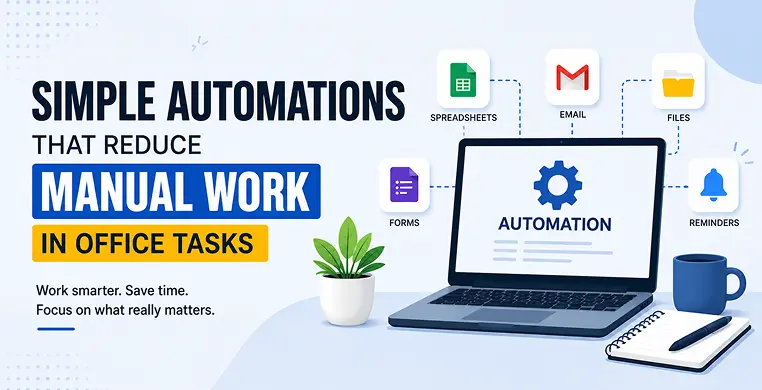
Office task automation simply means letting software handle the repetitive, predictable parts of your work — so people can spend their time on things that actually need a human. And the good news? You don’t need to be a developer or hire an IT team to make it happen. Most of it is simpler than people think.
Let’s break it down.
What Is Office Automation?
Office automation is any tool or setup that does a routine task for you, without you clicking, typing, or copying it every single time.
That’s it. No complicated definition needed.
A few everyday examples of office automation:
- An email that auto-replies when you’re out of office
- A form that automatically fills a spreadsheet when someone submits it
- A file that gets renamed and saved in the right folder by itself
- A reminder that pings your manager when an invoice needs approval
None of this is “advanced AI.” It’s just software doing the boring parts so you don’t have to.
Why Manual Work Is Still Slowing Teams Down
Here’s the thing — most offices don’t have one big problem. They have twenty small ones.
A little copy-paste here. A little manual data entry there. A follow-up email you have to remember to send. On their own, these tasks feel small. Add them up across a week, and they quietly eat hours that could’ve gone toward real work.
These small, repeated tasks also create bottlenecks — one person forgets to update a sheet, and now three other people are waiting. One approval doesn’t come through on time, and a whole project stalls.
Sound familiar? You’re not alone. Most offices run on manual habits simply because no one’s stopped to ask: “Does this really need a human doing it every time?”
Simple Automations You Can Set Up Today
You don’t need a huge system overhaul. Small automations, added one at a time, make the biggest difference.
Automating Repetitive Data Entry
Instead of typing the same details into multiple sheets, use templates and auto-fill tools that carry information from one form straight into your spreadsheet or database. Tools like Google Forms + Sheets, or Airtable, do this without any coding.
Automating Email Management
Instead of manually sorting, replying, and following up, set rules that sort incoming mail into folders, send automatic replies for common questions, and remind you when a message hasn’t been answered in two days.
Automating File and Document Handling
Instead of saving, renaming, and moving files by hand, automation tools can rename files based on a pattern, save them to the right folder, and even share them with the right person — automatically, the moment they’re created.
Connecting Your Apps With No-Code Automation
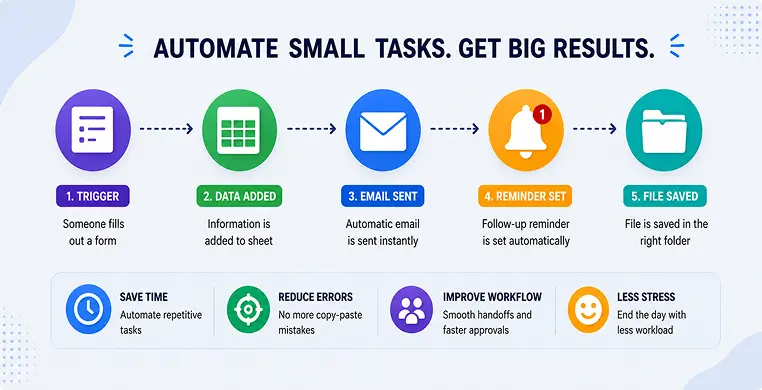
This is where things get really useful. No-code automation tools let you connect two apps so that an action taken in one automatically triggers an action that is in the other — no programming required. For example: “When someone fills a Google Form, add their details to a spreadsheet and send them a welcome email.” One trigger, done in seconds, every time.
Automating Approvals and Reminders
Instead of chasing people for sign-offs, set up simple “if this, then that” rules — when a request comes in, it’s automatically sent to the right approver, and if they don’t respond in a day, a reminder goes out on its own.
Best Free Office Automation Tools for Beginners
You don’t need to buy expensive software to get started. Here are some beginner-friendly picks:
| Tool | Good For | Free Option? |
|---|---|---|
| Zapier | Connecting apps (email, sheets, forms) | Yes, limited free plan |
| Make (Integromat) | Visual workflow automation | Yes, free tier available |
| Google Workspace (Forms, Sheets, Apps Script) | Data entry, simple workflows | Yes, mostly free |
| Trello with Butler | Task and approval automation | Yes, free tier available |
| IFTTT | Simple one-step automations | Yes, free basic plan |
If you’re searching for Zapier alternatives for office tasks, Make and IFTTT are worth trying — both are beginner-friendly and don’t need any technical background.
How to Start Automating Office Tasks
You don’t have to automate everything at once. In fact, you shouldn’t. Start small and build from there.
- Spot the repeat task: Look for anything you do the same way, more than twice a week.
- Pick one task to start with: Something simple, like sorting emails or copying form data.
- Choose a no-code tool: Zapier, Make, or Google Sheets automation are good starting points.
- Test it for a week: Make sure it works the way you expect before relying on it fully.
- Add the next automation: Once one task runs smoothly, move on to the next repetitive one.
This slow, steady approach avoids overwhelm — and it’s exactly how most small businesses build up their automation, one workflow at a time.
Loved What You Just Read?
Let's Build Something Just as Great — For Your Business.
From web & mobile apps to UI/UX, AI solutions, and digital marketing — NGD Technolab turns ideas into scalable, real-world products. 14+ years, 550+ projects, one team you can rely on.
Real Benefits Teams See After Automating
Once a few of these simple automations are in place, the change is noticeable pretty fast:
- More time for real work: less time spent on copy-paste, more time spent thinking
- Fewer errors: no more typos from manual data entry
- Smoother handoffs: nobody’s waiting on someone to remember a task
- Less end-of-day stress: the small stuff gets done without anyone chasing it
Remember Priya from earlier? With just two automations — form-to-sheet data entry and email sorting — she now finishes her actual work by 5, not 6:30. Nothing dramatic changed. She just stopped doing, by hand, what software could do instead.
Key Takeaways
- Office automation means letting software handle repetitive tasks, freeing up your time for real work
- You don’t need coding skills — no-code automation tools make this accessible to anyone
- Start small: pick one repetitive task and automate it before moving to the next
- Common wins include data entry, email sorting, approvals, and file handling
- The real payoff is time saved, fewer errors, and a calmer workday
Conclusion
Manual work has a way of quietly piling up until it eats your whole day. But as we saw with Priya, the fix isn’t a massive system change — it’s a handful of simple automations, added one at a time. Pick one repetitive task this week. Automate it. See how much lighter your day feels. Then do it again.
Frequently Asked Questions
What is office automation?
Office automation is the use of software tools to handle repetitive office tasks — like data entry, email replies, or file organizing — automatically, without someone doing it manually each time.
What are some easy examples of office automation?
Common examples include auto-filling spreadsheets from forms, sorting emails into folders, sending automatic reminders for approvals, and renaming or saving files based on set rules.
Do I need coding skills to automate office tasks?
No. Most modern automation tools are no-code, meaning you connect apps and set rules using simple drag-and-drop or point-and-click interfaces — no programming required.
What's the best free office automation tool for beginners?
Zapier and Google Workspace tools (Forms, Sheets, Apps Script) are great starting points, since both offer free plans and are easy to set up without technical experience.
How do I start automating my daily work tasks?
Start by identifying one task you repeat often, choose a simple no-code tool to handle it, test it for a week, and once it’s working smoothly, move on to automating the next repetitive task.