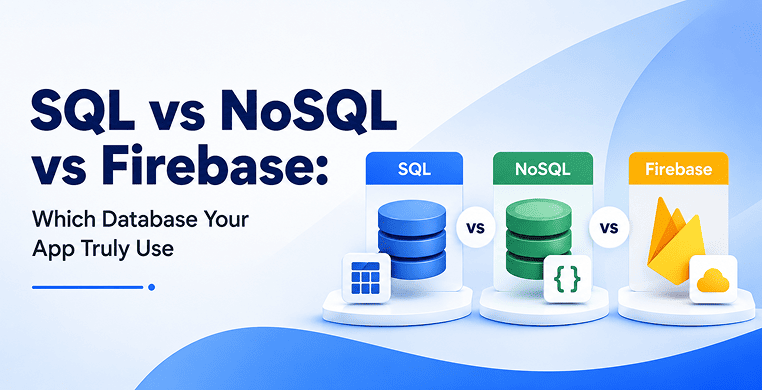
Picking a database is one of those decisions that feels reversible until it isn’t. Six months into a project, migrating from Firebase to PostgreSQL — or the other way around — usually means rewriting half your data layer. So it’s worth getting right early, even if “right” depends entirely on what you’re building.
This guide breaks down how SQL, NoSQL and Firebase actually differ, not in abstract computer-science terms, but in the ways that affect real app development: how your data is structured, how it scales, what it costs and which one saves you the most engineering time for the project you have in front of you.
The Core Difference: How Each One Stores Data
SQL databases like PostgreSQL and MySQL store data in tables with a fixed schema. Every row in a users table has the same columns and relationships between tables — say, linking a user to their orders — are enforced through foreign keys. If you want a user and their order history in one result, you write a JOIN.
NoSQL databases like MongoDB and Cassandra take a schema-less approach. Data lives in documents or key-value pairs and two records in the same collection don’t need to look alike. This is convenient in the early stages of a product, when your data model is still changing every sprint but it also means you’re pushing more of the structural discipline into your application code instead of the database.
Firebase is a bit of a different category entirely. It’s a serverless Backend-as-a-Service, and its two database products — Cloud Firestore and the Realtime Database — store data as JSON documents or a single JSON tree. Structurally, Firebase behaves like NoSQL, but it comes bundled with authentication, hosting and cloud functions, so you’re really choosing a full backend not just a data store.
None of these support native relational JOINs the way SQL does. Firebase and most NoSQL databases handle related data by duplicating it across documents — a practice called denormalization — which trades some storage efficiency for much faster reads.
Data Integrity: ACID vs. Eventual Consistency
SQL databases are built around ACID guarantees — Atomicity, Consistency, Isolation, Durability. In plain terms, a transaction either completes fully or not at all and once it’s committed, it stays that way. This matters enormously for anything involving money: payment processing, ledgers, billing systems. You don’t want a transfer that debits one account without crediting another.
NoSQL databases generally follow a BASE model instead — Basically Available, Soft state, Eventual consistency. Data will become consistent across the system eventually, but there’s a window where different nodes might briefly disagree. For a social media feed or a product catalog, that’s a fine trade-off. For a bank balance, it usually isn’t.
Firebase sits in between. It offers document-level ACID transactions within a single Firestore instance, but consistency guarantees loosen as you scale across regions. It’s a reasonable middle ground for most consumer apps, but not the first choice for financial infrastructure.
Scaling and Who Manages the Infrastructure
This is where the three options diverge the most in terms of day-to-day engineering work.
SQL databases scale vertically by default — you add more CPU, RAM, and storage to a single server. That works until it doesn’t and then you’re looking at read replicas or sharding tools like Citus, which add real complexity.
NoSQL databases are built for horizontal scaling from the start. You add more nodes, and the system distributes data across them using shard keys. This gives you strong write throughput at scale, but somebody still has to run that cluster — balancing nodes, managing repairs and watching for network partitions.
Firebase removes almost all of that operational burden. Google manages the servers, the scaling, the patching, and the replication. Your team never touches infrastructure. The tradeoff shows up in pricing: instead of paying for server capacity, you pay per read, write and delete operation, plus bandwidth. That model is cheap when usage is low and can get expensive fast once you’re serving millions of requests a day with an inefficient query pattern.
Real-Time Updates and Offline Support
If your app needs live updates — a chat app, a collaborative document editor, a live dashboard — Firebase has a genuine structural advantage. Its SDKs maintain a persistent connection to the client, so when data changes on the backend, connected devices see it instantly with no polling required.
It also includes built-in offline caching, so the app keeps working without a network connection and syncs automatically once it’s back.
Getting the same real-time behavior out of SQL or a standard NoSQL database means building it yourself — typically with WebSocket servers, a pub-sub layer like Redis or a change-data-capture pipeline watching the database’s write-ahead log. It’s doable and it gives you more control, but it adds real development time that Firebase gives you for free.
Analytics and Compliance
SQL is still the strongest option for analytics. Aggregate functions, window functions, and multi-table JOINs let analysts run complex queries directly and SQL databases connect cleanly to standard BI tools like Tableau or Power BI.
NoSQL and Firebase aren’t built for that kind of heavy analytical load. Running large aggregation queries directly against a production Firestore instance or NoSQL cluster can slow down the live app and rack up read costs. Most teams using Firebase end up streaming their data into a warehouse like BigQuery and running analytics there instead.
For regulated industries — finance, healthcare, legal — compliance is also a factor. SQL and enterprise NoSQL deployed inside a private VPC give you fine-grained role-based access control and full data governance. Firebase manages access through declarative Security Rules, which work well for straightforward permission models but can get difficult to audit once you’re dealing with complex, multi-tenant authorization logic.
Comparison at a Glance
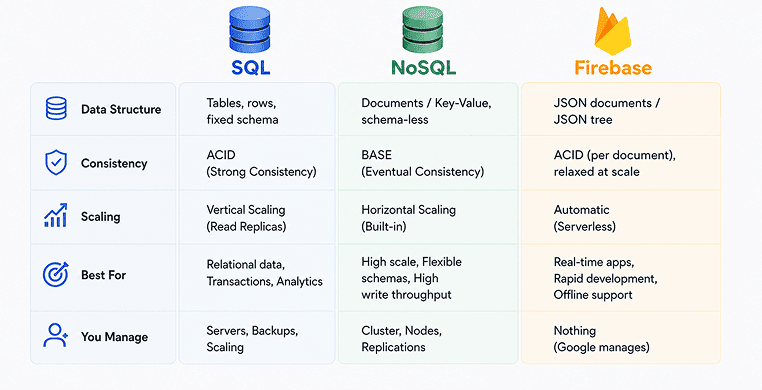
| Factor | SQL (PostgreSQL, MySQL) | NoSQL (MongoDB, Cassandra) | Firebase (Firestore, Realtime DB) |
|---|---|---|---|
| Data structure | Fixed tables, foreign keys | Flexible documents/key-value | JSON documents or tree |
| Joins | Native, multi-table | Not supported | Not supported |
| Consistency | Strict ACID | Mostly eventual (BASE) | Document-level ACID |
| Scaling | Vertical, then sharding | Horizontal by design | Fully managed, serverless |
| Real-time sync | Requires custom build | Requires custom build | Built into the SDK |
| Offline support | Custom implementation | Custom implementation | Built in |
| Analytics | Strong, native BI support | Requires ETL pipeline | Requires export to BigQuery |
| Ops overhead | Server management | Cluster management | None |
When Each One Actually Makes Sense
- Choose SQL: for anything involving money, complex relationships between entities, or heavy reporting — payment systems, ERPs, CRMs and platforms where a query touching five related tables is normal, not an edge case.
- Choose NoSQL: when your data doesn’t fit neatly into tables or when you need to absorb huge, high-velocity writes — IoT sensor logs, clickstream data, product catalogs with wildly different attributes per item. It’s also a reasonable choice early on, when your schema is still changing weekly and you don’t want migrations slowing you down.
- Choose Firebase: when speed to market matters more than infrastructure control — an MVP, a real-time chat or collaboration app, or any project where a small team wants authentication, hosting, and a live database without hiring someone to run servers.
You Don't Have to Pick Just One
Database selection isn’t always a single, permanent choice. Plenty of production systems pair PostgreSQL for core transactional data with Firebase for real-time client notifications, then route everything into a warehouse for analytics.
Loved What You Just Read?
Let's Build Something Just as Great — For Your Business.
From web & mobile apps to UI/UX, AI solutions, and digital marketing — NGD Technolab turns ideas into scalable, real-world products. 14+ years, 550+ projects, one team you can rely on.
Google has also been narrowing the historical gap between these worlds — Firebase’s relational offering, recently rebranded from Firebase Data Connect to Firebase SQL Connect, lets teams get a fully managed PostgreSQL database with Firebase’s client tooling and authentication layered on top, which is worth a look if you want Firebase’s developer experience without giving up SQL entirely.
The practical way to decide is to map your actual query patterns before committing. If a large share of what your app needs involves relationships between entities, start with SQL. If your data is naturally document-shaped and speed of iteration matters most, NoSQL or Firebase will get you there faster. The database that wins isn’t the most powerful one — it’s the one that matches how your application actually uses data.
Conclusion
There’s no universal winner in the SQL vs NoSQL vs Firebase debate and that’s the actual point. Each one was built to solve a different problem well, not to be the default answer for every app. The teams that end up happy with their choice are the ones who looked at their data first — how connected it is, how fast it changes, how it needs to move between server and client — and picked the database built for that shape of problem, rather than the one that was trending or easiest to set up on day one.
Frequently Asked Questions
Is Firebase SQL or NoSQL?
Firebase is a NoSQL platform. Its two database products, Cloud Firestore and the Realtime Database, store data as JSON documents or a single JSON tree rather than tables with fixed schemas. Firebase does now offer a relational option called Firebase SQL Connect (formerly Firebase Data Connect), which runs a fully managed PostgreSQL database behind the same Firebase tooling, but the core Firebase databases themselves remain NoSQL.
Which is better for a mobile app: SQL, NoSQL or Firebase?
It largely depends on what the app genuinely needs to do. Firebase tends to win for mobile apps that need real-time updates, offline sync and fast setup, since those features come built into its SDKs. NoSQL fits mobile apps with high write volume and loosely structured data, like activity feeds or logs. SQL is the better call when the app handles structured, relational data — think user accounts tied to orders, subscriptions or payments — where data integrity matters more than raw speed of iteration.
Can Firebase handle complex relational data?
Not natively. Firebase lacks native JOIN support, so developers typically denormalize data — duplicating related information across multiple documents — to keep reads fast without relational queries. For apps that genuinely need complex relationships, multi-table joins and strict referential integrity, Firebase SQL Connect or a dedicated SQL database is usually a better fit than forcing the relational model into Firestore.
Why would I choose NoSQL over SQL for my application?
NoSQL makes sense when your data doesn’t fit a fixed schema, when your product’s data model is still changing frequently or when you need to absorb very high write volumes across distributed servers. Applications like IoT sensor logging, clickstream tracking and product catalogs with wildly different attributes per item usually work better in a NoSQL document or wide-column store than in rigid SQL tables.
Is Firebase expensive at scale compared to SQL or NoSQL?
It can be. Firebase charges per read, write and delete operation plus bandwidth, which is inexpensive for small or early-stage apps but can grow quickly once you’re serving millions of daily requests, especially with inefficient query patterns. SQL and self-hosted NoSQL databases involve higher upfront infrastructure and engineering costs, but that cost tends to grow more predictably as usage scales into high-volume production traffic, which is why many teams reassess their database choice once they move past the MVP stage.