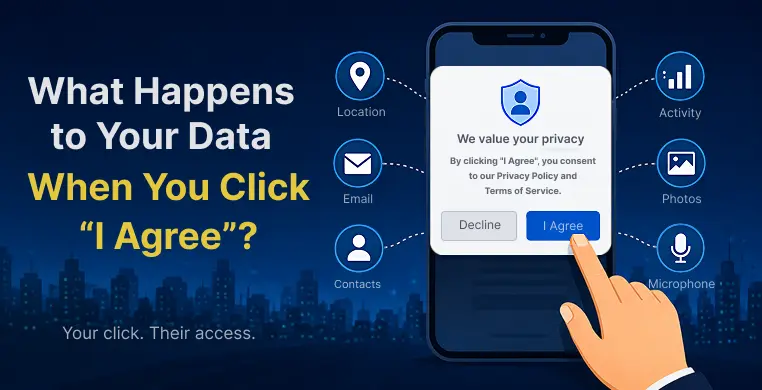
You’re installing a new app. A long grey box pops up. You scroll (or don’t), and you tap “I Agree.” Three seconds, and you’re in.
Most of us have done this a hundred times without reading a single line. But that single click is truly a real agreement — one that specifies who can see your name, your location, your habits, and sometimes even your photos. This guide breaks down what happens to your data when you click “I agree,” in plain English, with no legal jargon.
What Are You Actually Agreeing To?
Before we get into what happens after the click, let’s understand what’s inside that box you never read.
There are usually two documents hiding behind “I Agree”:
- Privacy Policy: explains what data the company collects, how it stores it, and who it shares it with.
- Terms of Service (ToS), sometimes called an End User License Agreement (EULA): explains the rules for using the app or website, like what you’re allowed to do and what the company is not responsible for.
Think of the Privacy Policy as “what we do with your stuff,” and the Terms of Service as “the rules of the house.” Both are written by lawyers, for lawyers, which is exactly why almost nobody reads them. But agreeing to them is still legally binding — even if you skipped straight to the bottom.
The Moment You Click "I Agree" — What Happens Next
Here’s the part most people never see.
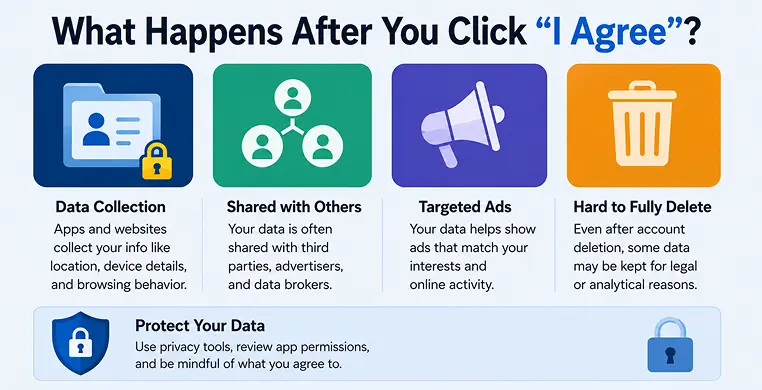
The second you tap “Agree,” the app or website doesn’t just let you in. It quietly starts an online data collection process in the background. Depending on the platform, this can include:
- Your name, email, and phone number
- Your location (sometimes even when the app is closed)
- Your device type, browser, and IP address
- What you click, scroll past, and linger on
- Your contacts, photos, or microphone — if you gave permission during setup
None of this is hidden exactly. It’s written in the privacy policy you skipped. It’s just written in a way that’s technically honest but practically invisible.
Who Gets Your Data? The Hidden Middlemen
This is the part that surprises people the most. Your data rarely stays with just one company.
Many apps share information with third parties — advertisers, analytics companies, and something called data brokers. A data broker is a company whose entire business is collecting personal details from many sources and selling them to whoever pays.
Your shopping habits, browsing history, and even your income bracket can end up in these databases. This is how targeted advertising works. You mention wanting new shoes to a friend, or search for them once, and suddenly every app is showing you sneaker ads.
It can feel like your phone is listening. Usually, it isn’t — it’s just that your data trail was already loud enough to guess what you’d want next.
Do Apps Really Sell Your Data to Third Parties?
Sometimes, yes — directly. More often, it’s subtler: apps share data with “partners” for advertising or analytics, and those partners can resell it. Free apps, in particular, often earn money this way. If you’re not making a purchase for the product, your data essentially is the product.
What Data Do Websites Collect When You Visit?
You don’t even need to sign up for something to be tracked. The moment a website loads, small tracking files called cookies start working. Cookies remember things like your login, your cart items, and your preferences — but they also track your movement across the internet.
That’s why websites ask, “Do you accept cookies?” It’s not just about saving your settings. It’s about user consent for tracking your behavior across sites, often for advertising purposes.
Can You Ever Take It Back?
A common question people ask after all this: can I revoke data consent after clicking “I agree”?
The honest answer is — partly.
Laws like the GDPR (in Europe) and the CCPA (in California) give users the right to ask companies what data they have, request deletion, and opt out of certain data sharing. Most apps now have a “Privacy” or “Data” section in settings where you can request this.
But here’s the catch: what happens to your data after you delete an account isn’t always full deletion. Some companies keep anonymized versions of your data for records, analytics, or legal reasons, even after your account is gone. Your digital footprint — the trail of data you’ve already left behind — doesn’t disappear the moment you hit delete.
Loved What You Just Read?
Let's Build Something Just as Great — For Your Business.
From web & mobile apps to UI/UX, AI solutions, and digital marketing — NGD Technolab turns ideas into scalable, real-world products. 14+ years, 550+ projects, one team you can rely on.
How to Protect Your Digital Footprint
You can’t avoid clicking “I agree” completely and still use the internet. But you can shrink how much of yourself you hand over.
- Use privacy-focused browsers like Brave or DuckDuckGo, which block trackers by default.
- Turn on a VPN when using public Wi-Fi or browsing sensitive topics, so your activity is harder to trace back to you.
- Review app permissions regularly — most phones let you turn off location or microphone access for apps that don’t need it.
- Opt out of data brokers where possible; some services can help you request removal from these databases in bulk.
- Skim, don’t skip — even a 30-second scan of a privacy policy can tell you if an app shares your data with advertisers.
None of these steps make you invisible online. But together, they turn you from an easy target into a harder one — and that alone makes a real difference.
Key Takeaways
- Clicking “I agree” means accepting both a Privacy Policy (what data is collected) and Terms of Service (the usage rules) — most people never read either.
- Once you agree that apps and websites can collect your name, location, device details, and browsing behavior.
- Your data often doesn’t stay with one company — it can be shared with advertisers and sold through data brokers.
- Laws like GDPR and CCPA let you request your data or ask for deletion, but full erasure isn’t always guaranteed.
- Tools like privacy browsers, VPNs, and careful permission settings can meaningfully reduce your digital footprint.
Conclusion
“I Agree” feels like a formality, but it’s really a small transaction — your data in exchange for a free app or a faster sign-up. That doesn’t mean you should panic every time you install something new. It just means it helps to know what you’re trading away.
The next time that grey box pops up, you don’t need to read every word. But a quick scroll through the headings, a check of what permissions the app is asking for, and a moment’s pause before tapping “Agree” — that’s enough to make you a more informed user than most people online today.
Frequently Asked Questions
What is a privacy policy, in simple terms?
A privacy policy is a document that explains what personal data a company collects from you, how it’s stored, and who it might be shared with. It’s different from the Terms of Service, which covers the rules of using the app or site.
Why do websites ask about cookies?
Cookies are small files that remember your activity on a site, like login details or cart items. Websites ask for your consent because cookies are also used to track your browsing behavior for advertising.
Is it safe to click "I agree" on every website?
Not always. It’s usually fine for well-known, reputable sites, but it’s worth being more careful on unfamiliar apps or websites, especially ones asking for access to your contacts, camera, or location.
How can I stop apps from collecting my data?
You can turn off unnecessary permissions in your phone’s settings, use privacy-focused browsers like Brave or DuckDuckGo, and review each app’s data settings to opt out of sharing where possible.
What happens to my data after I delete an account?
Most companies remove your active profile, but some retain anonymized or backup data for legal or analytical purposes. Full deletion depends on the company’s policy and applicable laws like GDPR or CCPA.