Imagine sitting down at your computer, opening a chat window, and typing: “Build me a fully functional budget tracker application that connects to my bank, categorizes my spending automatically, and shows a beautiful chart of my monthly savings.”
A few years ago, turning that sentence into a real, working application required an engineering degree, months of writing thousands of lines of complex code, and thousands of dollars.
Today, you press enter, sit back with a cup of coffee, watch lines of text fly across your screen, and test your new app inside a few minutes. This isn’t a distant tech fantasy. This is a massive shift in how software gets built, and it goes by a catchy new name: vibe coding.
But what does vibe coding mean for the average person? Can an absolute beginner, a non-technical startup founder, or a creative writer actually build a profitable software business without writing a single line of traditional code? Let’s dive deep into how this trend works, what tools make it happen, and whether you can use it to build your next big idea.
What Is Vibe Coding? (The Story Behind the Term)
If you are trying to understand the future of software development, you need to look at a viral moment that took the tech world by storm. The phrase was coined by Andrej Karpathy, one of the most respected minds in artificial intelligence, a founding member of OpenAI, and the former director of AI at Tesla.
Andrej Karpathy vibe coding became an instant internet sensation when he described a new way of working. He explained that he was building entire software applications purely by typing natural language prompts, reviewing the results, and guiding the AI.
Instead of manually writing and adjusting deep syntax, he was simply managing the “vibe” of the project.
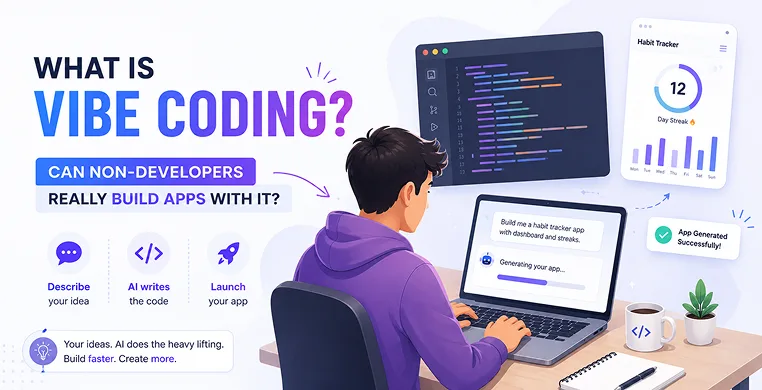
What does vibe coding mean in simple terms? Vibe coding is a style of application creation where a human acts as the director or architect, using everyday language to instruct an intelligent system, while an AI coding assistant handles one hundred percent of the actual typing, structuring, and formatting of the code behind the scenes.
This new way of building relies on prompt-driven development. You don’t need to spend months memorizing obscure symbols, brackets, or semi-colons. Instead, you use natural language to code.
Powerful underlying frameworks called Large Language Models (LLMs) such as Claude 3.5 Sonnet and GPT-4o understand exactly what you want to build and output production-ready software in seconds.
No-Code vs. Vibe Coding: What’s the Real Difference?
You might be wondering, “Wait, haven’t we been developing apps without programming for years using visual tools?” Yes, but there is a significant developmental gap between classic visual platforms and this new wave of intelligent development.
To see how much things have changed, look at this comparison table:
| Feature | Classic No-Code Platforms | Modern Vibe Coding |
|---|---|---|
| How You Build | Drag-and-drop visual blocks, boxes, and pre-made templates. | Typing your ideas in plain English just like texting a friend. |
| Customization | Limited. You can only do what the platform's visual menus allow. | Unlimited. The AI can write custom logic from scratch for any idea. |
| Under the Hood | You never see or touch the code; it lives hidden inside a closed platform. | Full access to code. You can use a vibe coding IDE, download the project, and save it locally. |
| Handling Bugs | If a feature breaks or isn't supported, you hit a brick wall. | Continuous debugging with AI handles fixes dynamically via chat. |
| Best For | Standard business websites, basic forms, and simple landing pages. | Custom software, unique SaaS tools, mobile applications, and complex automation. |
Can a Non-Developer Build an App with AI?
The short answer is yes, absolutely. But let’s look at the realistic side of how to build a SaaS without knowing how to code.
When you use an AI app builder for non-technical founders, you are skipping the hardest part of classic software development: memorizing programming languages. However, you are still participating in the software development lifecycle. This means you still need to think clearly about how your application should function.
Think of yourself as a home builder. In the old days, you had to manually chop down trees, cut every wooden board to the exact millimeter, and hammer every single nail yourself. If you miscalculated by an inch, the roof collapsed.
With vibe coding, you are the architect. You tell an incredibly fast, automated assistant exactly where the walls go, what color the doors should be, and how the rooms connect. The assistant slices the wood and drives the nails instantly.
However, things will occasionally go sideways. The AI might introduce an unexpected error, or a button might stop working correctly. This is where most beginners panic because they see syntax errors (broken code rules) they don’t recognize.
The secret to success is learning how to fix AI coding errors without knowing syntax. You don’t need to decipher the broken code yourself. You simply copy the error message, paste it back into your chat assistant, and say: “This error popped up when I clicked the save button. Why did this happen, and how do we fix it?” The AI is going to look at its own work, find the mistake, and fix it for you.
Simple Guide to Vibe Coding Your First App
Ready to transition from a passive reader to a creator? Let’s look at the exact workflow you will follow to build your very first digital product from scratch.
Write out exactly what your application needs to do on a single sheet of paper. Focus on one single, valuable feature first. If you want to build a fitness tracker, focus entirely on letting users log their daily workouts before trying to add social networking features.
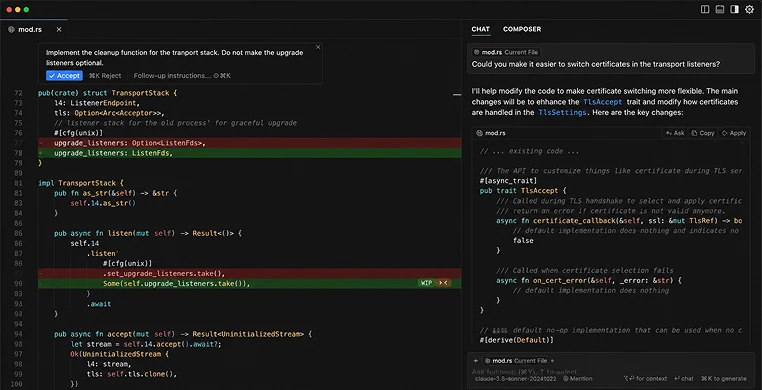
Download a specialized coding environment designed for human-AI collaboration. Platforms like Cursor IDE / Windsurf are perfect choices. They look like standard code editors but feature built-in chat windows where an AI can read and edit your entire project folder.
Open your workspace and tell the AI assistant what you want to create. Use simple, direct language. For example: “Create a single-page web app with HTML and Tailwind CSS that calculates a freelance designer’s ideal hourly rate according on their monthly expenses.”
The AI will generate the first version of your app. Open it in your web browser and test it out. If a font looks too small or a button feels misplaced, tell the AI: “The hourly rate text should be twice as large and highlighted in bright green.” This step-by-step adjustment process is called iterative prompting.
Click every option, fill out every form, and try to break your application. If a calculation returns an incorrect number, tell the AI exactly what went wrong. It will scan the underlying code and resolve the issue instantly.
Best AI Tools for Non-Programmers
If you are eager to get started, you need to pick the right platform. The AI programming trends are moving incredibly fast, but a few standalone tools have established themselves as the industry gold standard for beginners.
Loved What You Just Read?
Let's Build Something Just as Great — For Your Business.
From web & mobile apps to UI/UX, AI solutions, and digital marketing — NGD Technolab turns ideas into scalable, real-world products. 14+ years, 550+ projects, one team you can rely on.
If you are wondering, “Do you need to know code to use Cursor?”—the answer is no. While it looks like an advanced workspace for professional software engineers, its powerful sidebar chat makes it highly accessible for absolute beginners. It tracks your entire project, offers lightning-fast autocomplete features, and allows you to rewrite entire files with a simple text command.
This is perhaps the easiest entry point for absolute beginners. You don’t have to worry about complex installations or configuring a database. You simply log into your web browser, open the Replit Agent setup guide, and tell the digital assistant what to build. It handles the code generation, sets up the server, and gives you a live link to share with your friends or customers instantly.
If you are using a standard web interface like Claude AI for building web apps, you can ask it to generate code blocks directly in your conversation. Once you are satisfied with the results, you can learn how to export code from ChatGPT or Claude by clicking a single download button or copying the text into a plain file on your desktop.
Key Takeaways
- Language Is the New Code: You don’t need to learn JavaScript or Python to build software anymore; your ability to explain ideas clearly in plain English is your new programming language.
- Start with a Single Feature: Don’t try to build the next Amazon on day one. Focus on creating a simple, working prototype that solves one specific problem well.
- Embrace the Errors: When an application breaks, you don’t need to know how to read code. Copy the error message, hand it back to the AI assistant, and let it handle the heavy lifting.
Conclusion
Whenever new technology surfaces, people naturally wonder: will AI make coding obsolete?
The answer is nuanced. Vibe coding is changing the day-to-day work of software development, but it isn’t wiping out professional programmers. Instead, it is shifting their focus.
Professional engineers are using these tools to build software five times faster than they could manually. They don’t have to waste time typing repetitive structures or searching documentation for forgotten syntax. They can focus on high-level system architecture, security protocols, and advanced logic.
At the same time, this technology opens the door for vibe coding for non-developers. It levels the playing field, allowing non-technical startup founders, product managers, and everyday hobbyists to build real, functional prototypes without hiring an expensive development agency.
Frequently Asked Questions
Do I need to learn basic programming concepts to start vibe coding?
You do not need to learn syntax or formatting rules, but understanding basic structural logic helps immensely. Knowing the difference between a frontend user interface (what users see) and a backend database (where user information is stored) makes it much easier to write clear prompts for your AI assistant.
What happens if the AI app gets too big? Can it remember everything?
Modern AI models have a feature known as a context window, which determines how much information they can look at at one time. If your application grows into thousands of lines of code across dozens of files, standard chat interfaces might start losing track of earlier details. Using a dedicated workspace like Cursor helps overcome this limit by explicitly pointing the AI to specific files when asking for changes.
Can I actually launch a profitable commercial SaaS business using only AI code?
Yes, many creators have built and launched revenue-generating apps entirely on their own using prompt-driven design. However, as your customer base scales, you will eventually want to bring in a technical expert to double-check security measures, audit payment gateways, and optimize server costs.
What is the single ideal tool for a beginner to use right now?
If you want the absolute simplest setup where everything runs automatically inside your web browser, start with Replit Agent. If you want to save your project files locally on your own laptop and have complete ownership over the source files, download Cursor IDE.
Will vibe coding replace traditional software engineers?
No, it transforms their workflow rather than replacing them entirely. It eliminates mundane, repetitive typing, turning programmers into high-level directors who manage multiple AI systems to assemble complex platforms at unprecedented speeds.