
You open an app. You wait. The screen just sits there, frozen on a loading circle. Three seconds pass. Then five. You tap the screen again, just in case tapping helps (it never does). And somewhere in your head, a small voice says, “Should I just delete this?”
Most apps feel slow for a handful of very fixable reasons — big file sizes, too many server calls, no caching, and heavy images — and every one of them can be fixed with the right approach.
That’s really what this blog is about.
The Moment You Almost Deleted the App
Think about the last app you deleted. It probably wasn’t because the app looked bad. It was because it felt slow. Buttons that didn’t respond fast enough. Screens that took forever to load. A checkout page that froze right when you were about to pay.
That frustration has a name in the tech world: poor app performance. And once a user feels it, they rarely stick around to feel it twice. This is exactly why app speed isn’t just a “nice to have” anymore — it’s the difference between an app people love and an app people forget.
So let’s break down why this happens, and what actually makes an app fast.
What Makes an App Feel Fast or Slow?
An app “feels” fast when it responds the moment you touch it — screens open instantly, images show up right away, and nothing makes you wait. An app feels slow when there’s a gap between what you do and what the app shows you.
That gap is called app latency. It includes things like:
- How long the app takes to open the first time
- How fast it loads a new screen
- How quickly it responds to your taps
- How long it takes to fetch data, like your feed or your cart
Even a one or two second delay can feel like forever to a user, especially today, when everyone is used to apps like Instagram or Google Maps that load almost instantly.
Why Are Some Apps So Slow? (The Real Reasons)
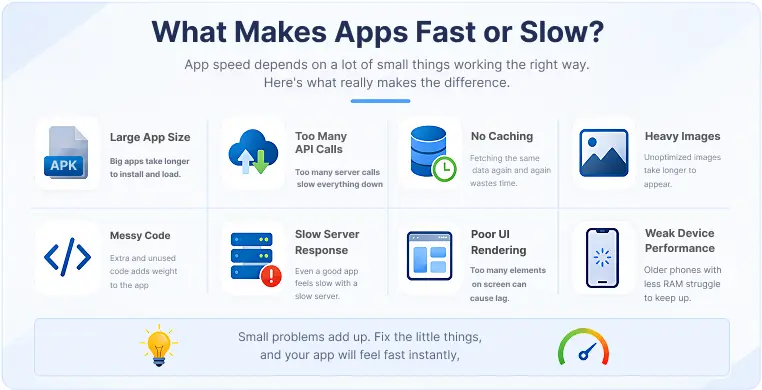
There isn’t one single reason apps slow down. It’s usually a mix of small problems that add up. Here are the most common ones:
- Large app size: Apps packed with unused code, heavy graphics, or unnecessary features take longer to install and run.
- Too many API calls: Every time an app talks to a server to fetch data, it takes time. If it’s making too many of these calls, or making them at the wrong time, the app slows down.
- No caching: Without caching, an app fetches the same data again and again instead of storing it locally for quick reuse. Good caching strategies are one of the simplest ways to speed things up.
- Heavy images: High-resolution images that aren’t compressed or lazy loaded take longer to appear on screen, especially on a weak network.
- Messy code: Code that isn’t cleaned up or minified adds extra weight the app has to carry every time it runs.
- Slow server response time: Even a well-built app can feel slow if the server on the other end takes too long to respond.
- Poor UI rendering: If the app is drawing too many elements on screen at once, animations and scrolling can start to lag.
None of these are unusual. In fact, most apps struggle with at least one of them at some point. The difference is whether the team behind the app catches it early or lets it pile up.
Fast Apps vs Slow Apps: What's the Difference?
Fast apps and slow apps aren’t built with completely different tools. The difference is in the choices made during development.
| What Fast Apps Do | What Slow Apps Skip |
|---|---|
| Cache data locally so it loads instantly next time | Fetch the same data over and over from the server |
| Load images only when needed (lazy loading) | Load every image at once, even off-screen ones |
| Keep the app bundle size small | Carry unused code and features that add weight |
| Minify and clean up code | Leave old, unused code lying around |
| Make fewer, smarter API calls | Send too many requests that slow everything down |
| Test speed regularly before launch | Only notice problems after users complain |
This is really the whole story of why apps are fast or slow. It’s not luck. It’s a series of small, deliberate decisions made along the way.
Why Do Apps Lag on Old Phones?
If you’ve ever asked “why is my mobile app so slow on Android,” especially on an older phone, the answer usually comes down to hardware limits. Older phones have less memory (RAM), slower processors, and often have many apps running in the background at the same time.
Even a well-optimized app has to work harder on older hardware. Add a phone that’s low on storage, and things get worse, because the phone has less room to process new data quickly. This is why the same app can feel fast on one phone and painfully slow on another.
How to Make Your App Faster (Practical Fixes)
Here’s the part you actually came for. If you’re wondering how to make an app faster, here’s where to start:
- Reduce your app bundle size: Remove unused libraries, images, and code you don’t actually need. A smaller app installs faster and runs smoother.
- Use smart caching strategies: Store data that doesn’t change often, like user profiles or settings, so the app doesn’t fetch it every single time.
- Lazy load images: Only load images when the user actually scrolls to them, instead of loading everything at once.
- Minify your code: Cleaning up and compressing your code reduces the work the app has to do behind the scenes.
- Optimize your API calls: Combine requests where possible, and avoid calling the server for data you already have.
- Compress images before uploading them: A smaller image file can load in a fraction of the time without losing visible quality.
- Test on real devices, not just simulators: Some slowdowns only show up on actual phones, especially older or lower-end ones.
These fixes don’t need to happen all at once. Even tackling one or two of them can noticeably reduce your app loading time.
How to Test If Your App Is Actually Slow
Before fixing anything, it helps to know exactly how slow your app really is. This is where a mobile app speed test comes in. These tests measure things like load time, response time, and how the app behaves under different network conditions.
So, what is a good app load time? As a general rule, users expect an app to open in under 2 to 3 seconds. Anything beyond that, and people start noticing the wait. There are tools built specifically for mobile app speed monitoring that track these numbers over time, so you’re not just guessing.
Loved What You Just Read?
Let's Build Something Just as Great — For Your Business.
From web & mobile apps to UI/UX, AI solutions, and digital marketing — NGD Technolab turns ideas into scalable, real-world products. 14+ years, 550+ projects, one team you can rely on.
Why Speed Matters More Than You Think
A slow app doesn’t just annoy people in the moment. It changes how they feel about the entire brand. Studies across the app industry consistently show that even small delays hurt a business’s user retention rate. People compare your app to the fastest app they used that day, whether that’s fair or not.
On the other hand, a fast app builds trust without even trying. Users don’t think about why it feels good. They just keep coming back.
Key Takeaways
- App speed is shaped by many small factors, not one big issue — bundle size, caching, API calls, and images all add up.
- Fast apps use caching, lazy loading, and minified code to stay light and responsive.
- Older phones make even good apps feel slower due to hardware limits.
- A good app load time is generally under 2 to 3 seconds.
- Regular speed testing helps catch problems before users notice them.
- Small, consistent fixes matter more than one big rebuild.
Conclusion
At the end of the day, app speed isn’t a technical detail hidden behind the scenes. It’s the first impression, the daily experience, and often the reason someone stays or leaves. The good news is that slow apps aren’t stuck being slow forever. With the right fixes, like better caching, smaller app sizes, smarter API calls, and regular speed testing, almost any app can become noticeably faster.
Frequently Asked Questions
Why is my mobile app so slow on Android?
This usually happens due to a mix of large app size, too many background processes, low phone storage, or a weak network connection. Older Android devices with limited RAM also struggle to run heavier apps smoothly.
What is a good app load time?
Most users expect an app to open within 2 to 3 seconds. Anything longer than that, and people start noticing the delay, which can lead to frustration or even uninstalling the app.
How can I reduce my app's loading time?
Start by reducing your app’s bundle size, compressing images, using caching for data that doesn’t change often, and optimizing how many API calls your app makes. Lazy loading images also helps a lot.
What tools can I use to test app speed?
There are several mobile app speed monitoring tools available that measure load time, response time, and performance under different network conditions. These give you real numbers instead of just a feeling that “something feels off.”
Does app size affect performance?
Yes, significantly. A larger app takes longer to install, uses more storage, and often takes longer to load screens, especially on older or lower-end phones. Keeping your app size lean is one of the simplest ways to improve speed.